
Tuesday, 10:40
Municipal office, desk 2
A visitor becomes threatening during a discussion about a bill. The member of staff presses the SOSCard button. The selected colleague receives an alarm and can arrange assistance.
02 · Silent alarms for staff
The TWIG SOSCard looks like an ID badge. One press of the button silently alerts colleagues, the police or our emergency response centre.
Everyday examples
These fictitious examples show how a silent alarm can be used at work. The actual recipients and response procedures are agreed for each organisation.
Tuesday, 10:40
A visitor becomes threatening during a discussion about a bill. The member of staff presses the SOSCard button. The selected colleague receives an alarm and can arrange assistance.
Thursday, 13:15
A parent enters a classroom unannounced and threatens a teacher. The teacher raises a silent alarm. The emergency response centre assesses the situation through the voice connection and follows the agreed response procedure.
Saturday, 23:50
A patient becomes aggressive at reception. A nurse presses the SOSCard button without having to dial a number. Security receives the alert according to the agreed response procedure.
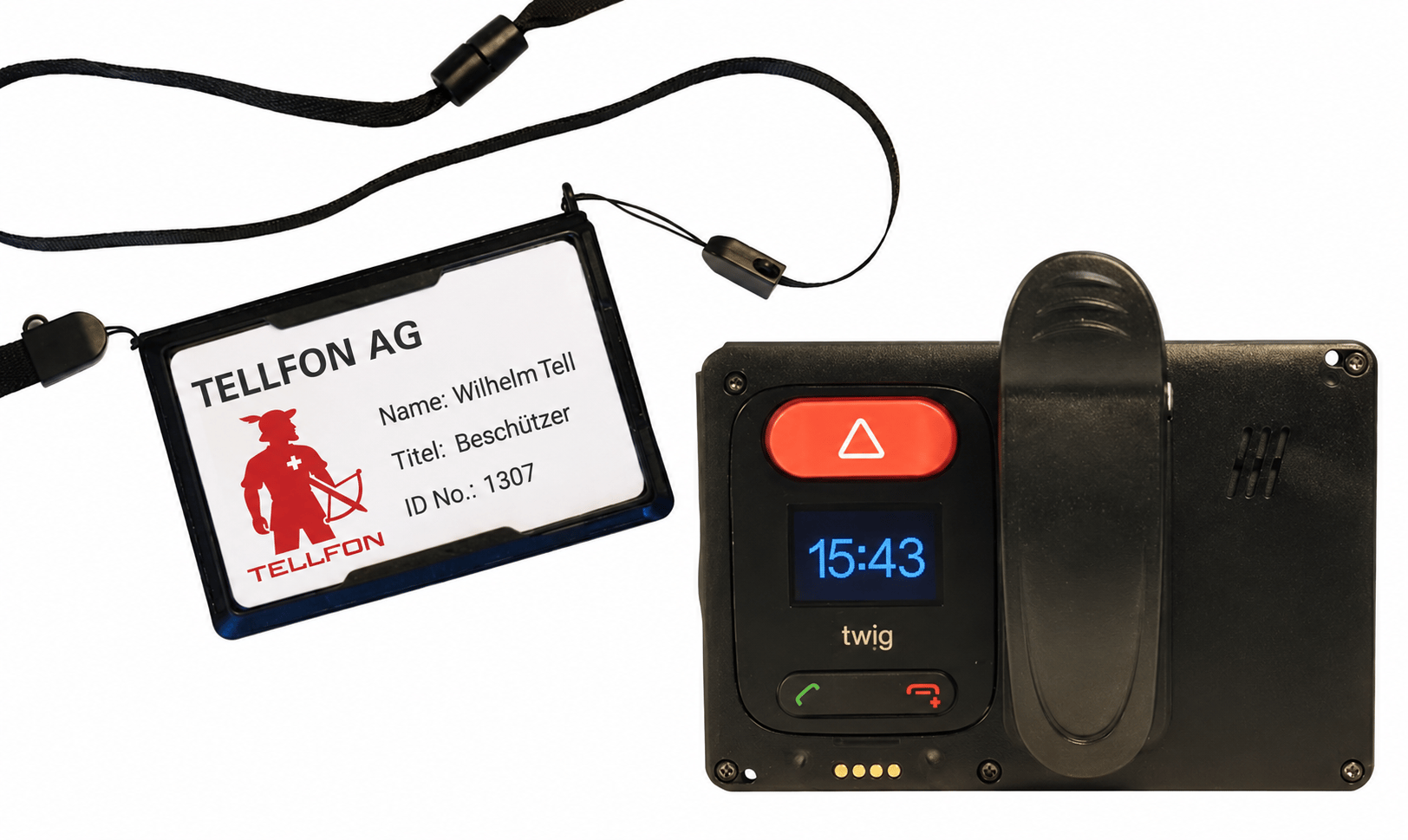
Devices
An ID badge with an emergency button.
The TWIG SOSCard clips to clothing or hangs from a lanyard, with space for a staff ID on the front. The rear contains a 4G alarm device with an SOS button, display and speaker.
The card can be configured to raise an alarm without sound or light. The selected recipients receive the available location information and can use the enabled voice connection to assess the situation.
Sequence
The alarm and voice connection give the response centre information to assess the situation and follow the agreed escalation procedure.
Press the SOS button. The card can be configured to remain silent.
The emergency response centre receives the alarm and can assess the situation through the enabled voice connection.
Depending on the situation, it calls in your own team, the police or both.
The location sent with the alarm helps responders find the person. Indoor positioning depends on the installed infrastructure.
Silent activation
The SOSCard can be configured to raise an alarm without an audible or visible signal. The designated recipients can then assess the situation and arrange help.
Accessory
The Remote Button is a panic button for simple, discreet triggering of an alarm from a distance. For example, from an adjacent room when a colleague at the counter is being threatened.
When configured for silent activation, the card emits no alarm sound or light.
After an alarm, the enabled voice connection lets the emergency response centre listen and assess the situation.
Satellite positioning outdoors, Wi-Fi and beacons indoors. Accuracy depends on the building and the installed infrastructure.
Configurable fall, tilt and no-movement alarms can raise an alert when the wearer cannot press the button.
After the alarm
The system records alarm times, available location information and the response steps captured in the log. These records support incident reviews.
The voice connection is configured to open after an alarm, not for routine monitoring.
In detail
Technical specifications, battery life and remote configuration options.
*Operating times may vary depending on environment and configuration.
FAQ
Yes. The SOSCard can be configured to emit no sound or light when activated. The emergency response centre can then use the enabled voice connection to assess the situation.
The intended setup opens the voice connection after a manual or configured automatic alarm, rather than for routine monitoring. We explain the relevant settings and permissions during commissioning.
We agree the alarm recipients with you: designated colleagues, our 24-hour emergency response centre or emergency-service contacts where the connection has been arranged. Schedules can route alarms to different contacts at different times.
Yes, with the appropriate setup. Outdoors the SOSCard uses satellite positioning; indoors it can use Wi-Fi and beacons. We assess the required infrastructure and expected coverage during planning.
Configured automatic alarms can respond to a fall, impact, unusual device position or prolonged lack of movement. We test the functions required for your organisation.
We show you the SOSCard on site and decide together who is notified for which alarm.